Changelog
What changed in StoryVault — new features, improvements, and important fixes.
Current version: v2026.10.12 — StoryVault uses
Calendar Versioning: the date is the version.
October 2026
Section titled “October 2026”2026-10-12 — Safer AI connections
Section titled “2026-10-12 — Safer AI connections”When connecting an AI client, choose the approved organizations and separately allow write access if needed. Sign-in uses the StoryVault interface. Under Profile → Connected apps → Manage permissions, review organizations, permissions and expiry dates and revoke individual permissions; password changes invalidate earlier access. Existing OAuth connections must be approved again once. API keys remain unchanged.
The updated Claude setup guide walks through sign-in, organization selection, read/write permissions, expiry and revocation with current screenshots. The example grants read access only to Sozialwerk Musterstadt.
View the Claude consent screen
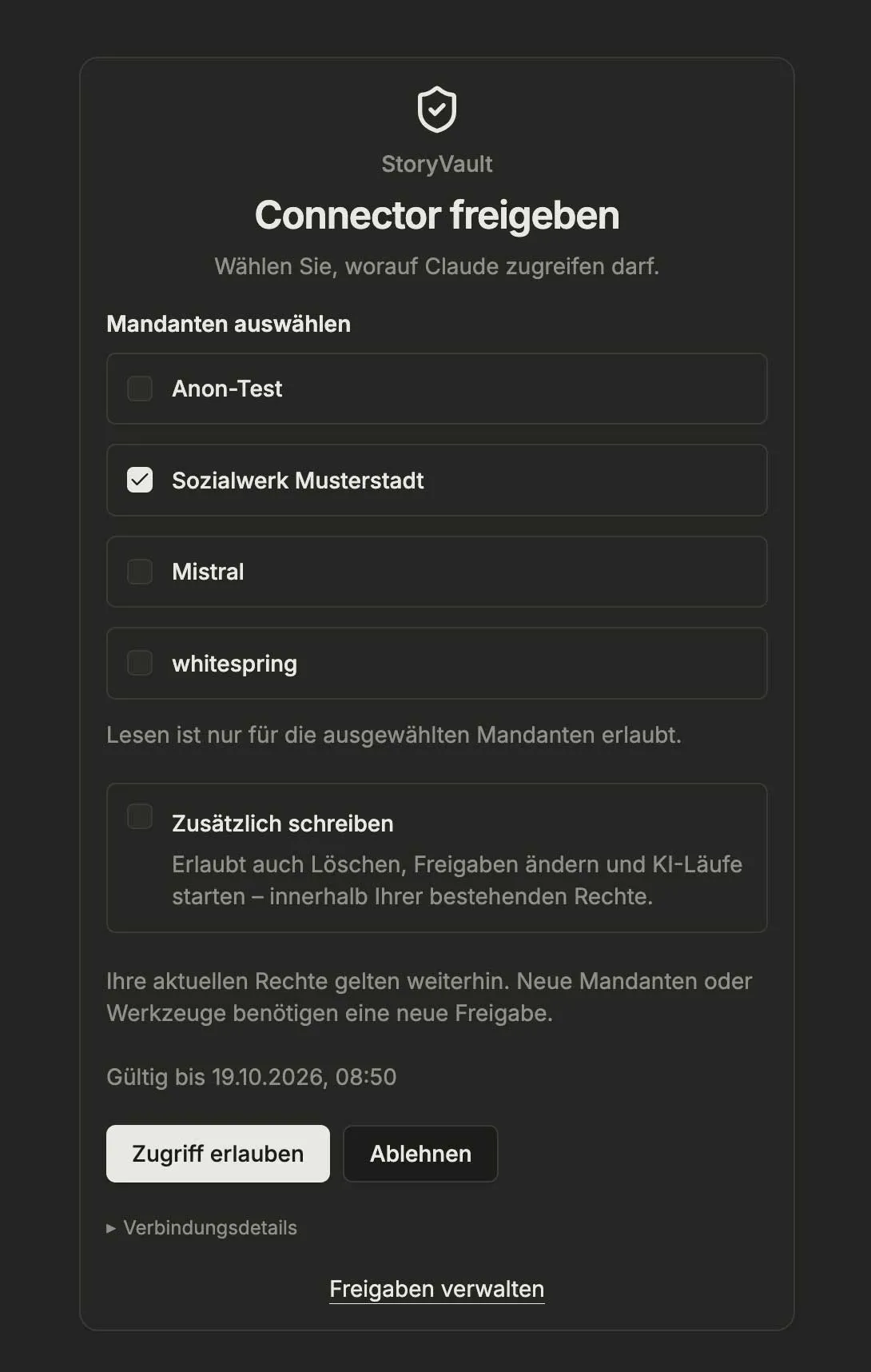
German interface, 12 October 2026. The date and available organizations depend on your account.
2026-10-10 — More reliable process proposals
Section titled “2026-10-10 — More reliable process proposals”-
Improved: Larger process diagrams are checked and saved step by step. Individual invalid details are corrected without discarding valid work. Request separate pools and participant handoffs in process chat.
-
Fixed: After accepting an AI proposal, process chat shows the saved version. Its review button stays hidden after reloading.
2026-10-09 — Model processes and understand usage
Section titled “2026-10-09 — Model processes and understand usage”- New: Processes connects BPMN diagrams with interview sources, participants, and guides. You review and accept AI proposals before saving. The module is available when enabled for your organization.
- Improved: The usage overview distinguishes AI model sizes, transcription, and knowledge processing. Usage earlier in the month remains attributable when a model changes.
- New: The process help covers the editor, AI chat, sources, versions, access, and export, with screenshots from the Sozialwerk Musterstadt demo tenant.
2026-10-09 — Continue chats and plan data protection
Section titled “2026-10-09 — Continue chats and plan data protection”- Improved: Longer AI chat requests survive navigation. You can check their status, cancel a request, or retry a failed attempt.
- New: Data protection administrators can permanently anonymize sessions after a set period. Existing sessions are collected for review first.
- Fixed: Transcript drafts survive refreshes of the session view and can be saved as a new version.
2026-10-09 — Recover recordings and compare transcripts
Section titled “2026-10-09 — Recover recordings and compare transcripts”- Improved: In the browser recorder, locally saved recordings can be reopened and uploaded after an interruption.
- New: Transcript versions can be compared and restored. Imported versions remain available after re-transcription.
- New: Without an invitation, you can request access. Your request is reviewed after email confirmation.
2026-10-02 — Documentation of current functionality
Section titled “2026-10-02 — Documentation of current functionality”-
Microsoft Teams import no longer appears in the sidebar by default. If your organization uses it, your StoryVault contact can help with setup and access.
-
Long recordings retain conversation passages at transitions. Uncertain transitions appear in the transcript for review. Existing transcripts are not automatically regenerated.
-
Recorder and source selection respect your organization’s enabled modules and user permissions.
September 2026
Section titled “September 2026”2026-09-11 — Participant access and steadier analysis
Section titled “2026-09-11 — Participant access and steadier analysis”New
- Recorder and project chat use matching active templates as a dialogue, for example for BPMN interviews; follow-up questions stay in the same chat.
- Files can be added as in the normal chat, including before the first message.
- Saving a recording attaches an independent copy of the explicitly selected chat and its files to the session. A notice in the lobby and studio explains who will be able to see them. Files also appear under Notes → Files.
- Recording date: the platform supports the actual recording date for sorting, filters, titles and filenames.
Details: Recorder.
- Participants now see sessions assigned to them in read-only mode; visibility and write actions follow the role strictly.
Fixed
- AI knowledge-graph extraction completes reliably even for very long model outputs (automatic continuation instead of aborting).
- Interrupted media downloads resume more robustly.
- Content from PDF attachments can be analyzed more reliably.
- The maintenance banner fits within the screen width again.
2026-09-08 — More reliable uploads and clearer access
Section titled “2026-09-08 — More reliable uploads and clearer access”Fixed
- PDF files can be uploaded as session attachments again; failed uploads are shown there.
- Chat lists and global search now show only your own chats, including for admins.
- The recorder, session creation, and uploads follow existing user permissions: enabling a module alone is not enough.
- The admin user search no longer reloads twice for one input.
August 2026
Section titled “August 2026”2026-08-26 — More reliable media downloads
Section titled “2026-08-26 — More reliable media downloads”Fixed
- Audio and video downloads now survive brief connection drops without failing — transfers resume automatically.
2026-08-23 — Search back to full strength
Section titled “2026-08-23 — Search back to full strength”Fixed
- Global search returns complete results across projects, sessions, and content again.
- Projects now rank ahead of individual sessions in search results, so jumping into the right project is faster.
2026-08-20 — Faster login and a calmer transcript
Section titled “2026-08-20 — Faster login and a calmer transcript”Improved
- The storyvault.eu start page now has direct login buttons into the app.
Fixed
- The transcript reliably scrolls along during playback again and no longer loses its anchor.
2026-08-19 — Microsoft Teams import and AI titles
Section titled “2026-08-19 — Microsoft Teams import and AI titles”New
- Microsoft Teams import: Teams recordings and their transcripts can be imported straight from Microsoft 365 — pick them individually or import automatically, including speaker attribution. (Admin area, uses the existing Microsoft connection.)
- AI titles from content: sessions can get a meaningful title generated from the conversation — per session or in bulk for a whole project. The previous title is kept and can be restored at any time.
- Summaries and titles for many sessions now run as a background queue; progress is visible in the admin dashboard.
2026-08-18 — Privacy governance: protection levels and anonymization
Section titled “2026-08-18 — Privacy governance: protection levels and anonymization”New
- Protection levels for sessions and projects: content can be protected in stages — from openly accessible to fully anonymized. (Optional module.)
- Anonymization and pseudonymization: names and personal details in transcripts are replaced; with pseudonymization, authorized users can re-identify in a controlled way.
- Legal holds: content under legal preservation is protected from deletion and modification.
- Governance area: manage policies, running protection operations, and approvals (four-eyes principle) in one place.
Improved
- The upload dialog now also accepts transcript files — existing written records can be uploaded alongside or instead of audio/video.
2026-08-07 — Zoom import stabilized
Section titled “2026-08-07 — Zoom import stabilized”Fixed
- Zoom credentials are now reliably kept after saving; aborted imports were repaired.
- Zoom meetings without a stored host email can now be imported as well.
July 2026
Section titled “July 2026”2026-07-31 — Review coding suggestions one by one, and safe confirmation
Section titled “2026-07-31 — Review coding suggestions one by one, and safe confirmation”New
- AI coding suggestions can now be reviewed individually: inspect, accept, or reject each suggestion right in the sidebar.
- Critical actions can ask for re-authentication directly in the dialog (step-up) — without leaving the page.
Improved
- The codebook sidebar in the coding tab is now resizable.
2026-07-24 — API access and better page titles
Section titled “2026-07-24 — API access and better page titles”New
- Admins can assign the API capability. Users can then manage their own API keys without an admin role.
Improved
- Browser tabs and history now show the current StoryVault area instead of only “StoryVault”.
- Tenant admins and other roles only see and edit content covered by their organization and permissions. The separation also covers search, exports, trash, AI context, knowledge stores, and bot history.
2026-07-04 — Lists, user menu, and polish
Section titled “2026-07-04 — Lists, user menu, and polish”New
- Saved views: In project and session lists you can save the current mix of sort order, view mode, and filters as a named view, switch between them, and delete them — per user.
- Inline title editing: Project and session titles can be renamed by clicking them directly on the detail page.
- Archive projects: archive and restore projects right from the edit page (for people who can manage the project).
- Language (German/English) and appearance (Light/System/Dark) can now be switched right from the user menu via a compact toggle.
Improved
- Session actions (Export, Archive, Delete) are grouped in a tidy management menu.
- Calmer, denser interface with more compact spacing and clearer empty states; the admin area is grouped more clearly.
- Meeting bots start new recordings in speaker view (still switchable).
- Faster loading thanks to locally served fonts.
- Ongoing improvements to stability, security, and code quality.
Fixed
- Media playback stays stable across page refreshes and brief streaming errors.
- LMS lessons reliably save uploads and shared attachments again.
2026-07-03 — Document sets for coding reports
Section titled “2026-07-03 — Document sets for coding reports”New
- Coding reports can now be run over document sets — named selections of sessions instead of always the whole project.
- Sets are static (a fixed, reproducible session list) or dynamic (a rule over freely assigned session tags, e.g.
phase=main-study). - A comparison mode places two sets side by side (frequencies and co-occurrence matrix) without mixing them.
- Snapshots freeze the session selection and codebook state in a citable way — for robust, repeatable analyses.
June 2026
Section titled “June 2026”2026-06-30 — Edit session date
Section titled “2026-06-30 — Edit session date”New
- Admins can now correct a session’s date and time.
2026-06-25 — Share projects with groups
Section titled “2026-06-25 — Share projects with groups”New
- Projects can be shared with entire user groups — new group members then automatically gain access.
- Several people can be added to a project together in a single step.
2026-06-24 — Date placeholders in analysis templates
Section titled “2026-06-24 — Date placeholders in analysis templates”New
- Analysis templates can now insert the session date and the current date (e.g. for deadline or recency context). The available placeholders are listed in the template editor.
2026-06-23 — The AI chat shows its steps and backs up answers
Section titled “2026-06-23 — The AI chat shows its steps and backs up answers”New
- While working, the AI chat now shows live what it is doing (which sources and tools it uses).
- On request, the chat quotes verbatim transcript passages and names the source session.
- For projects, the chat can generate retro questions: targeted questions about open knowledge gaps across all of a project’s sessions — including directly in the recorder.
- Recordings can be linked to the preparation chat they were planned with; the session later shows that chat as “Preparation”.
Improved
- Knowledge-graph answers are better sourced (with the source session) and surface the requested categories (e.g. decisions, tasks) first.
2026-06-20 — Reliable large uploads
Section titled “2026-06-20 — Reliable large uploads”Improved
- Very large recordings are uploaded in resilient chunks, reducing failures during long uploads.
2026-06-19 — Chat images and secure confirmations
Section titled “2026-06-19 — Chat images and secure confirmations”Improved
- Image uploads in chat now have clear size limits with a pre-check: oversized images are caught before sending, and sending waits until all attachments are fully prepared.
- People who sign in via Microsoft/SSO without their own password can now approve destructive actions such as deleting a project or tenant via a typed confirmation (e.g.
LÖSCHEN project-name) instead of a password. - Various improvements and bug fixes — including more reliable exports of very large projects and fixes in admin group management.
2026-06-14 — Lists remember sorting and filters
Section titled “2026-06-14 — Lists remember sorting and filters”New
- Session and project lists remember sort order, direction, and selected view per user.
- The selection persists across page reloads and later visits.
Improved
- The project knowledge graph paginates large node counts instead of loading everything at once.
2026-06-13 — Browser tab audio in the recorder
Section titled “2026-06-13 — Browser tab audio in the recorder”New
- The recorder can now capture audio from a shared browser tab in addition to your microphone — useful for web calls or online sources without extra mic routing.
- The level meter shows each active audio source separately; colors and visibility were toned down.
2026-06-10 — Share links: media access controlled separately
Section titled “2026-06-10 — Share links: media access controlled separately”New
- In share links, media access is now independent from media download. Recipients can play back the recording in the browser without download being implicitly allowed.
- Managers can now manage project sharing themselves — previously admin-only.
Improved
- Speaker quick-pick in transcripts adapts to column width and stays usable on narrow screens.
2026-06-09 — Who has access: more visible and faster
Section titled “2026-06-09 — Who has access: more visible and faster”New
- Projects and sessions show an access icon listing everyone with access — visible from the list view without opening the share dialog.
- The icon distinguishes shared members, tenant admins (implicit), and external recipients.
- Clicking the icon opens the share dialog directly.
- The meeting-bot project picker is now searchable and sorted.
Improved
- Sort order in project and session lists persists between visits.
- Knowledge extraction runs without a batch limit on very large projects.
2026-06-08 — Speaker names in exports and bulk archiving
Section titled “2026-06-08 — Speaker names in exports and bulk archiving”New
- Transcript exports (TXT/SRT/VTT/JSON) now include assigned speaker names instead of generic “Speaker 1/2”.
- In a project, multiple sessions can be selected at once and sent to the trash together.
2026-06-07 — Admin: safer tenant and user lifecycle
Section titled “2026-06-07 — Admin: safer tenant and user lifecycle”New
- Tenants and users can be deleted or offboarded through a guided flow with clear safeguards for the last admin.
- Admin pickers for people, groups, and projects are now searchable via full-text.
- The admin user overview shows how many tenants each person is a member of.
2026-06-06 — New provisioning wizard and improved invite flow
Section titled “2026-06-06 — New provisioning wizard and improved invite flow”New
- Admins can invite new users into a tenant through a multi-step wizard — including plan selection and prepared access.
- Invitation and first-login emails clearly guide through name and password setup before the first login is possible.
- Password-reset links are validated before the entry form, so you don’t reach the form only to be rejected on submit.
Improved
- Activating or deactivating modules now validates dependencies automatically — e.g. “LMS requires Knowledge”.
- The wizard shows the current tenant name so it’s clear where the invite lands.
2026-06-11 — New recorder with video and screen recording
Section titled “2026-06-11 — New recorder with video and screen recording”New
- The recorder in the sidebar now also records video: camera only, screen only, or screen and camera combined — in up to Full HD (1080p).
- With screen + camera, your webcam appears as a small overlay; pick any corner and change it live during the recording.
- Before recording, check your microphone and camera in the lobby with a live level meter, then enter the studio with preview and countdown.
- Camera off and no screen sharing? You get a pure audio recording as before — ideal for voice notes.
- On smartphones, camera and audio recordings are available; screen recording is available on desktop.
2026-06-04 — Transcript sidecar: JSON, speakers, thumbnails
Section titled “2026-06-04 — Transcript sidecar: JSON, speakers, thumbnails”New
- Sidecar uploads now accept the StoryVault JSON transcript format with per-segment timestamps.
- Speaker assignments from a sidecar transcript are carried over — no manual reassignment when the source already names speakers.
- Sidecar uploads trigger thumbnail generation so the session list looks consistent.
May 2026
Section titled “May 2026”2026-05-31 — Passwordless login, project colors, and overhauled share links
Section titled “2026-05-31 — Passwordless login, project colors, and overhauled share links”New
- The sign-in page now offers Sign in with Magic Link below “Forgot password?”.
- StoryVault sends an email with a single-use link that is valid for 5 minutes.
- The link opens a confirmation page — only the click there signs you in. This keeps mail scanners and link previews from consuming the link.
- Up to two magic links per email address can be requested per hour.
- Projects can be tagged with one of eight pre-defined colors.
- The color appears as a subtle accent in the project list and on the detail page.
- The picker lives under “Color” when editing a project.
- Share links control permissions individually: media download, transcript download, attachments, notes, and external links.
- Recipients can have their own private AI chat about the session when “Free chat” is enabled. You set message caps per recipient and total.
- AI answers inside a share link can be copied or downloaded as Markdown, PDF, or DOCX.
Improved
- Notes render as formatted text; external links are validated and open in a new tab.
- Tabs in the shared view now mirror the session detail page: Transcript, Files, Notes, AI Chat.
- Revoked share links can be reactivated instead of recreated.
- Security-relevant changes to a share link force recipients to re-enter the password.
Fixed
- Free AI chat keeps showing existing conversations when a message cap is reached; instead of “unavailable”, a clear notice is shown.
2026-05-29 — Import existing transcripts during upload
Section titled “2026-05-29 — Import existing transcripts during upload”New
- Audio and video files can be uploaded together with existing SRT, VTT, or TXT transcripts.
- StoryVault matches pairs by filename, for example
episode-01.mp3andepisode-01.srt. - For matched pairs, the existing transcript is imported and no new automatic transcription is started.
2026-05-28 — Leave a tenant yourself
Section titled “2026-05-28 — Leave a tenant yourself”New
- Users can now leave a tenant themselves when their role and membership allow it.
- StoryVault protects the last admins and critical memberships from accidental removal.
- Tenant switching stays consistent after leaving a tenant.
2026-05-27 — Model controls for prompts and ZIP import by URL
Section titled “2026-05-27 — Model controls for prompts and ZIP import by URL”New
- Admins can choose model and token budget more explicitly for prompt templates.
- Coding suggestions use the central master prompt configuration.
- An automated model check helps catch unavailable AI models early.
- Admins can import large export ZIPs from a public HTTPS URL.
- The download continues in the background even when the browser window is closed.
- The import page shows progress and still opens the preview before anything is imported.
2026-05-22 — Qualitative coding and reports
Section titled “2026-05-22 — Qualitative coding and reports”New
- The new Coding module supports codebooks, manual transcript coding, and hierarchical subcodes.
- Multiple codes on the same transcript passage are visible in the transcript.
- Coding reports show frequencies, matrices, summaries, code clouds, co-occurrences, and quotes.
- Reports can be exported as styled files.
Improved
- Codes remain available after re-transcription and are marked for review when text positions shifted.
- Codes can be nested by drag and drop, searched, and restored from trash.
2026-05-21 — Manage Meeting Bot recordings
Section titled “2026-05-21 — Manage Meeting Bot recordings”Improved
- Administrators see ongoing and previous Meeting Bot recordings and their status in one overview.
- Recordings can be stopped more reliably or restarted after a failure.
2026-05-18 — Riverside links and help tours
Section titled “2026-05-18 — Riverside links and help tours”Improved
- The Meeting Bot now supports Riverside meeting links.
- Onboarding tours can be dismissed or reopened directly from the help menu.
2026-05-09 — Guided tour, help button, and hardened security
Section titled “2026-05-09 — Guided tour, help button, and hardened security”New
- A new quick-start tour covers uploads, sessions, transcripts, files, notes, knowledge, and AI Chat.
- The “Onboarding & Help” button opens tours matched to role and enabled modules.
- Tours can be paused or reset.
Improved
- Upload administration and MCP access were hardened.
- Mobile apps can synchronize tenant switching more reliably.
- Archived project sessions no longer appear in active project lists.
2026-05-08 — Sign in with Microsoft 365
Section titled “2026-05-08 — Sign in with Microsoft 365”New
- Users can sign in with a Microsoft 365 / Entra ID account.
- Sign-in is tenant-bound and protects against access from unrelated organizations.
- Password sign-in remains available.
2026-05-06 — More consistent dialogs and transcript source
Section titled “2026-05-06 — More consistent dialogs and transcript source”Improved
- Many form dialogs are now more consistent and compact.
- Analyses and exports use the edited transcript version.
- Admins can correct a session date after creation.
- Time zones are displayed more consistently across server and client views.
2026-05-05 — Faster transcript work
Section titled “2026-05-05 — Faster transcript work”New
- Speakers can be assigned with quick buttons.
- Spacebar starts or pauses playback; arrow keys seek through the audio.
- Transcripts can be downloaded with numbering and re-transcribed when needed.
Improved
- Long transcripts render incrementally and feel smoother.
- The active utterance and scroll position stay better synchronized during playback.
2026-05-04 — Calendar with planned and past sessions
Section titled “2026-05-04 — Calendar with planned and past sessions”Improved
- The calendar shows planned Meeting Bots and past sessions together.
- Event details use clearer labels.
- Colors distinguish planned and past entries more clearly.
2026-05-03 — Meeting Bot reliability improvements
Section titled “2026-05-03 — Meeting Bot reliability improvements”New
- A restart button helps retry failed bot runs faster.
- The recent bot session list is paginated and shows the starter email instead of technical IDs.
- Very long meeting URLs are shown as a link icon.
Improved
- Recording loss and false error classifications were reduced.
- Processing of Teams recordings has been improved.
- Benign exit information is no longer shown as a red error.
2026-05-02 — Better interview knowledge graphs
Section titled “2026-05-02 — Better interview knowledge graphs”Improved
- Interview metadata and shared ontologies improve knowledge graph structure.
- Similar interview elements are grouped more consistently by subtype.
- Bot join failures now show clearer status and exit reasons.
April 2026
Section titled “April 2026”2026-04-30 — More compact dashboard + tenant badge
Section titled “2026-04-30 — More compact dashboard + tenant badge”Improved
- The dashboard now shows the most important widgets by default.
- The tenant badge is visible next to the avatar.
- Sidebar favorites are now consistently called “Pins”.
2026-04-29 — Attachments as knowledge sources, Cmd+K, and more usability
Section titled “2026-04-29 — Attachments as knowledge sources, Cmd+K, and more usability”New
- PDFs, DOCX files, and other attachments can be used as knowledge sources.
- Knowledge Stores have a new attachment source picker.
- Attachment content can be used by the knowledge graph and AI Chat.
- Lessons can include extra downloads and external links.
- Materials appear directly in the lesson player.
- Unsafe file types are rejected during upload.
- Existing Vimeo recordings can be imported into StoryVault.
- Credentials are protected per tenant.
- Imported videos are processed like regular uploads.
Improved
- AI Chat can use content from attached documents.
- The chat shows how much context is already in use.
- Long conversations keep the most important material prioritized.
Cmd+KorCtrl+Kopens search from any page.- Results include projects, sessions, transcripts, and chats.
- “Recently opened” shows recent browser activity.
- Detail pages now show a clear path.
- Filters and sorting survive reloads.
- Filtered lists can be shared by URL.
- Tables can be sorted from their column headers.
- Lists keep sorting and view state in the URL.
- Sessions, projects, and courses offer matching view switches.
- Skip-to-content link for screen readers and keyboard users.
- Form errors are better connected to their fields.
- Icon buttons have clearer labels for assistive technologies.
2026-04-28 — UX polish, readable colors, and academic citations
Section titled “2026-04-28 — UX polish, readable colors, and academic citations”Improved
- Empty states now show clearer next steps.
- Errors appear as toasts with retry actions.
- Delete actions consistently ask for confirmation.
- Brand text is easier to read on light backgrounds.
- Every transcript utterance has a citation-ready number.
- Print view and citation actions support academic work.
- Terms like “tenant”, “Knowledge Store”, and “Compliance” have short explanations.
- Tooltips work with hover and keyboard focus.
2026-04-27 — Attachments live with the session
Section titled “2026-04-27 — Attachments live with the session”Improved
- Session exports include attachments.
- Imports and cloning include attachments.
- Shared sessions can include attachment downloads.
2026-04-25 — Inline transcript corrections and playback speed
Section titled “2026-04-25 — Inline transcript corrections and playback speed”New
- Individual sentences can be corrected directly in the transcript.
- Speakers can be reassigned per line.
- AI analysis uses the corrected version.
- Audio and video can be played slower or faster.
- Voices remain naturally understandable.
- The setting is remembered per browser.
2026-04-17 — Multi-tenant memberships
Section titled “2026-04-17 — Multi-tenant memberships”New
- One user can belong to multiple tenants.
- The tenant switcher is available in the user menu.
- Dashboard and pins are stored per tenant.
2026-04-15 — Combined Sessions and drag-and-drop upload
Section titled “2026-04-15 — Combined Sessions and drag-and-drop upload”New
- Multiple recordings can be combined into one session.
- Recording order can be changed with drag-and-drop.
- Summary, knowledge graph, and Knowledge Store use the combined transcript.
- Files can be dropped directly onto the session list.
- The upload dialog helps choose the project.
- Single files skip unnecessary intermediate steps.
March 2026
Section titled “March 2026”2026-03-29 — AI Chat as knowledge-graph agent
Section titled “2026-03-29 — AI Chat as knowledge-graph agent”New
- Chat can query the knowledge graph directly.
- Answers show traceable sources from the project context.
2026-03-28 — Project knowledge graph, API versioning, and more security
Section titled “2026-03-28 — Project knowledge graph, API versioning, and more security”New
- Projects get a knowledge graph across all sessions.
- People, topics, decisions, and tasks are connected.
- Nodes link back to the original transcript location.
- Public API calls can specify a version.
- Long lists now load page by page.
Improved
- Nodes can be grouped by type.
- Search and direct links make navigation easier.
- Role and access checks are applied more consistently.
- Inputs and error handling are stricter.
- Critical actions are better protected against accidental or unauthorized use.
2026-03-17 — Bulk user import via CSV
Section titled “2026-03-17 — Bulk user import via CSV”New
- Admins can create multiple users from a CSV file.
- Users can be assigned directly to courses or groups.
- Welcome emails are sent automatically.
2026-03-13 — Courses: clone, delete, trash
Section titled “2026-03-13 — Courses: clone, delete, trash”New
- Courses can be copied and moved to trash.
- Restore and permanent deletion are available from trash.
2026-03-12 — iOS recorder app: native auth
Section titled “2026-03-12 — iOS recorder app: native auth”New
- The native iOS app supports StoryVault sign-in.
- Recordings are stored offline and synchronized when connected.
2026-03-11 — Lesson status and more reliable large exports
Section titled “2026-03-11 — Lesson status and more reliable large exports”Improved
- Lessons show their editing status.
- Content is easier to sort and review in the editor.
- Very large exports and imports run more reliably.
- The import dialog stays usable with large ZIP files.
- Interrupted processing is detected more reliably.
2026-03-10 — Rename speakers and calendar month view
Section titled “2026-03-10 — Rename speakers and calendar month view”New
- Detected speakers can get custom names in the transcript.
- Changes apply to every occurrence in the session.
- Sessions can be shown in a monthly calendar.
- Clicking a day filters the list.
2026-03-09 — Video processing for admins
Section titled “2026-03-09 — Video processing for admins”New
- Admins can see status and progress for video processing.
- Failed processing can be started again.
2026-03-06 — LMS lessons with mini thumbnails
Section titled “2026-03-06 — LMS lessons with mini thumbnails”Improved
- Course editors show small previews for modules and lessons.
- Previews can be regenerated for whole courses.
2026-03-05 — Large imports
Section titled “2026-03-05 — Large imports”Improved
- ZIP files over 5 GB import more reliably.
- Progress is visible in the import dialog.
- The browser remains usable during import.
2026-03-04 — Knowledge Store
Section titled “2026-03-04 — Knowledge Store”New
- Content can be used as searchable knowledge sources.
- Sessions and attachments can be added as sources.
- AI Chat can use Knowledge Stores and cite sources.
February 2026
Section titled “February 2026”2026-02-28 — Standalone chat, API keys, MCP, pricing, and LMS export
Section titled “2026-02-28 — Standalone chat, API keys, MCP, pricing, and LMS export”New
- New chat without session context.
- API keys enable programmatic access.
- Chat and API access can be managed from user and admin areas.
- StoryVault data can be used in Claude through MCP.
- Projects, sessions, transcripts, courses, and chats can be retrieved.
- Connections support API keys and OAuth.
- AI usage prices can be managed per tenant.
- Usage pages show current and historical costs more clearly.
- Courses can be exported and imported into other tenants.
- Lessons can be unlocked in a fixed sequence.
- Individual lessons can be shared as previews.
- Lesson content can be suggested from title and description.
- Course completion shows a motivating completion moment.
- Trainers can optionally be notified.
Improved
- Upload dialogs clearly show the size limit.
- Files over the limit show a clear error.
2026-02-27 — Sidebar pins, Office documents in chat, and widget dashboard
Section titled “2026-02-27 — Sidebar pins, Office documents in chat, and widget dashboard”New
- Frequently used navigation items can be pinned.
- Pinned items appear at the top of the sidebar.
- DOCX, XLSX, and PPTX can be analyzed as chat attachments.
- Supported in addition to PDF and text files.
Improved
- Widgets can be reordered, shown, and hidden.
- Configuration is stored per user and tenant.
2026-02-25 — LMS Phase 2: compliance, knowledge checks, and course chat
Section titled “2026-02-25 — LMS Phase 2: compliance, knowledge checks, and course chat”New
- Mandatory courses with compliance reports.
- Group assignments by department, location, or role.
- Trainer dashboard with course analytics.
- Automatic email reminders before deadlines.
- Short quizzes after each lesson.
- Multiple-choice, true/false, and free-text questions are supported.
- Feedback is emphasized over grading.
- AI Chat guides learners with follow-up questions.
- Works at lesson, module, and course level.
- Module chat knows all lessons in a module.
- Course chat knows the full course.
- Knowledge Stores can be added as extra context.
- Courses are automatically completed when all lessons are done.
- Completion emails can be sent.
2026-02-24 — LMS module system & capabilities
Section titled “2026-02-24 — LMS module system & capabilities”New
- Courses, modules, lessons, quizzes, and progress are available as the LMS foundation.
- Roles and capabilities control who learns, trains, or administrates.
2026-02-21 — Session sharing, email bot, multi-language, and cost overview
Section titled “2026-02-21 — Session sharing, email bot, multi-language, and cost overview”New
- The meeting bot can be scheduled by calendar invitation.
- Updates and cancellations from invitations are handled.
- Sessions can be shared by public or password-protected link.
- Links can be revoked at any time.
- The interface is available in German and English.
- Users can switch language from the menu.
- Tenants get their own usage and cost overview.
- The mobile recorder can keep the display awake while recording.
Improved
- Lists refresh automatically when you return to the app.
- The sidebar is easier to scan.
2026-02-20 — Global search
Section titled “2026-02-20 — Global search”New
- Search across projects, sessions, transcripts, and chats.
- Transcript content is searchable.
2026-02-18 — PWA recorder, project chat, and streaming summaries
Section titled “2026-02-18 — PWA recorder, project chat, and streaming summaries”New
- Recording directly in the mobile browser.
- Offline recordings sync later.
- The display stays awake while recording.
- Chat can answer questions across all sessions in a project.
- Answers use project context and existing summaries.
- Summaries appear step by step while they are created.
- Creation can continue after an interruption.
2026-02-17 — Meeting bot, auto-summary, dark mode, and usage dashboard
Section titled “2026-02-17 — Meeting bot, auto-summary, dark mode, and usage dashboard”New
- Light, dark, and system theme.
- Mobile navigation via a clearer menu.
- The bot joins the meeting by link.
- It records automatically and stores the recording in StoryVault.
- Audio-only and video modes are available.
- Existing Zoom recordings can be imported later.
- Imported recordings are processed like regular uploads.
- A German summary can be generated after transcription.
- Structured sections help with key topics, insights, and decisions.
- Summaries appear in the session header and list previews.
- More transparency for usage and costs.
- Cost overview by tenant and module.
- Daily and monthly budgets with warnings.
Improved
- Auto-summary, chat answers, and analyses are shown with formatting.
- Copy and download actions are available directly on the result.
2026-02-15 — Initial launch
Section titled “2026-02-15 — Initial launch”New
- Multi-tenant platform for organizations.
- Role and permission management.
- Sessions, projects, and transcripts.
- File upload with automatic processing.
- Administration for organizations and users.