Session Chat
Session Chat answers questions using the transcript of one session. Use it for summaries, tasks, decisions, and targeted follow-up questions about a statement.
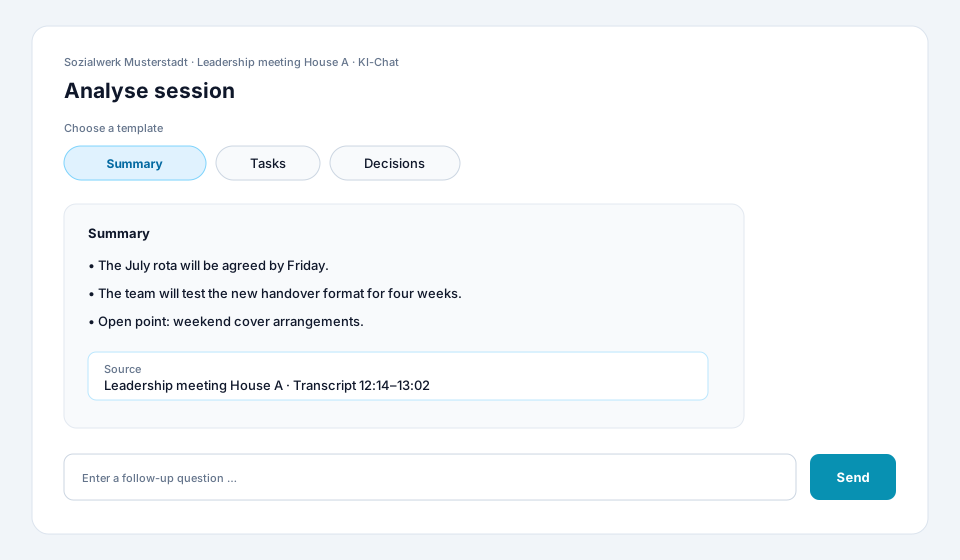
Analyse a session
Section titled “Analyse a session”-
Choose a session
Under Sessions, open a session with a completed transcript. Check the title and project to make sure you are analysing the correct source.
-
Open AI Chat
Switch to the AI Chat tab. The conversation in this tab uses the transcript of this session as its context.
-
Start with a template or write a question
Choose an available template such as Summary, Tasks, or Decisions. Alternatively, write your own specific question.
-
Review the answer and evidence
Read the full answer. Open any source references or search for distinctive wording in the transcript. Verify names, deadlines, numbers, and decisions in particular.
-
Refine with follow-up questions
Refer to the previous answer, for example:
Assign the tasks to the people mentioned and mark missing deadlines.The conversation history remains available as context. -
Use the result
Copy the verified content into your minutes or working document. Mark points that are not clearly supported by the conversation.
Write effective questions
Section titled “Write effective questions”An effective question states the desired result, structure, and verification rule.
| Goal | Example |
|---|---|
| Overview | Summarise the five most important topics as bullet points. |
| Tasks | List the task, responsible person, and stated deadline in a table. Write “not stated” where information is missing. |
| Decisions | Which decisions were explicitly made? Separate them from proposals. |
| Track a topic | What was said about staffing? Include the relevant transcript passage. |
| Check uncertainty | Which points remained open or were discussed inconsistently? |
Automatic summary and chat
Section titled “Automatic summary and chat”The automatic summary on the session page is created independently of the chat. Use Session Chat when you need a different structure, more detail, or a follow-up question. For important decisions, verify both types of output against the transcript.
If an answer is not useful
Section titled “If an answer is not useful”- Narrow the question by naming the period, topic, people, and desired format.
- Explicitly ask the AI to mark missing information as not stated.
- When changing topics, start a clearly scoped new question.
- Check whether the transcript is complete and speaker assignments are plausible.
- If the tab or templates are missing, ask your administrator to check the session type, module, and permission.